Table of contents
Before starting a claim under the “Claims” module in TMS, we advise all users to consult the following:
- The scope of the Claims module
- The Procedural Rules Governing the Football Tribunal (outlining time limits and rules regarding advances of costs).
Claims must be entered in TMS by the club holding a TMS account or, in the case of a club without a TMS account, by the Member Association concerned.
To create the claim, click “Claim solidarity contribution”.
“Player” section
The details of the player involved in the claim must be provided. To do so, search for the player by entering the player’s name, nationality, date of birth or player ID. If the player is in the TMS database, the player’s name will appear in the drop-down list. To avoid creating a duplicate player record, ensure that you use the correct spelling of the player’s name (as stated in the player’s proof of identity), nationality (or nationalities) and date of birth. For more information on how to search for, create and edit players, see “Searching for, creating and editing players”.
If the player is not in the TMS database, you can create a new player manually by clicking on “Create new player”.
Once you have selected the player, the player’s details will appear in the “Player” section.
You will be requested to enter the registration information for each season in which the player was registered at the claimant club. The information entered here must be consistent with the documents uploaded in the claim, specifically the player’s passport and the official statement confirming the start and end dates of the season.
Complete all fields as applicable. You may click on “Add season” to add more registration information.
The player’s registration dates must be within the season start and end dates. The season may not exceed 365 days.
“Claimant” section
Club view
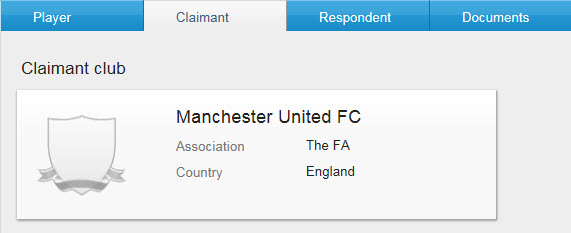
If you are acting as a club, your club will automatically be selected as the claimant, and this information cannot be changed.
Member Association view
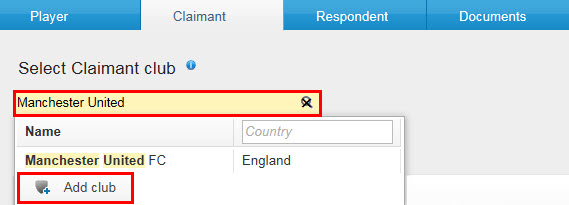
If you are acting as a Member Association, you must select the claimant club by typing its name in the relevant field. If the club is registered in TMS, the name will appear in the drop-down list. If the club is not registered in TMS, add the club manually by clicking on “Add club”.
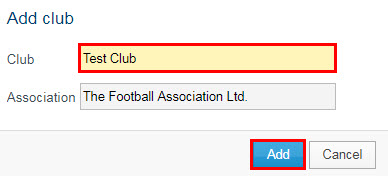
Enter the club’s name. Note that the name of your Member Association will automatically appear because you can only select or add claimant clubs that are affiliated to your Member Association. Click on “Add” to complete the action.
You must then indicate whether the claimant club has ceased to participate in organised football and/or no longer exists.
If you select “Yes” for the statement “Claimant has ceased to participate in organised football and/or no longer exists”, you will be required to upload a document that proves this information is true.
“Respondent” section
The respondent club, meaning the player’s new club, must be selected by typing its name in the relevant field. If the club is registered in TMS, the name will appear in the drop-down list.
Also enter the name of the player’s former club in the relevant field.
If one or both clubs are not registered in TMS, please contact the TMS Helpdesk.
Complete the “Transfer information” section as accurately as possible by entering the month and year of the transfer.
“Documents” section
The system will ask you to upload certain mandatory documents.
Once all mandatory documents have been uploaded, you can upload optional documents before clicking on “Submit claim”. After the claim has been submitted, it will no longer be possible for the claimant to edit or remove any uploaded document.
Confirmation
The system will display a summary of the information you have entered, allowing you to verify the claim details one last time before submitting it. Once the claim has been submitted, it will no longer be possible for you to edit the details of the claim.
Check the relevant box to certify that all the information is true and correct, then click “Submit claim”.
The claim will appear in the system with “Submitted” status.