Table of contents
When club data must be re-synced
If the name, FIFA ID or status of a club that is currently participating in an EPP review process has been changed in TMS either manually or via the club synchronisation function (see the “Editing club details” section) after the creation of the EPP, the club data in the EPP will not be automatically updated. Instead, the new club data will be highlighted in orange and the Member Association can to manually re-sync the data in the EPP by clicking on the three vertical dots and then on “Club re-sync”.
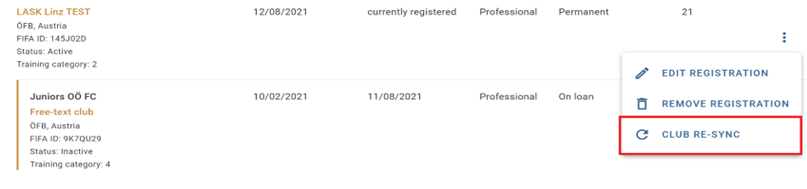
Re-sync the club
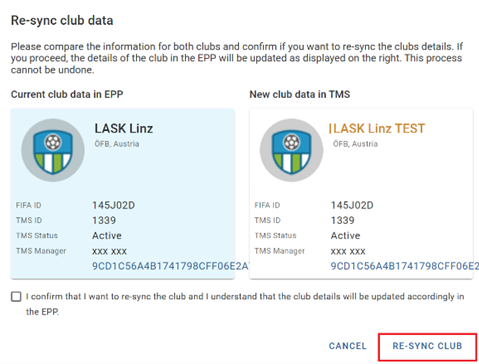
A pop-up window will display the current and new club data. The updated information will be highlighted in orange. If you wish to re-sync the club, tick the checkbox to confirm the update and click on “Re-sync club”.
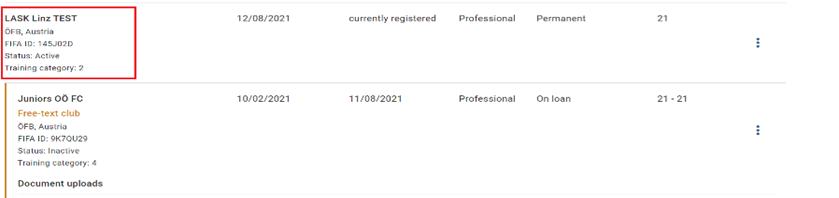
The updated club data then appears in all the relevant registrations in that EPP.
Limitations
When re-syncing a club, the new data will only be reflected in that specific EPP. If the same club is involved in a review process for more than one EPP, the club must be re-synced separately for each EPP.
This option is only available when the status of the EPP is “Review” or “Completion”.