Table of contents
Clubs and Member Associations must keep their address, telephone number and email address valid and up to date at all times.
Follow the steps below to edit a TMS user profile.
Changing the email address of a TMS user
To change a TMS user’s email address, send the following document to the TMS Helpdesk:
- A letter on the organisation’s official letterhead, signed by the user concerned, stating their new email address, previous email address and the reason for the change.
A template for this request is available in the Help Centre document library.
Changing the two-step verification method
If you have set up two-step verification for TMS, you can change the method directly in TMS at any time. For more information on this topic, see the section “Two-step verification”.
Changing the TMS manager
The TMS manager is the organisation’s main point of contact for all matters related to TMS and receives communications and letters from FIFA.
The TMS manager must therefore be available to respond to TMS requests from FIFA or other users. All TMS user contact details must be kept up to date.
To register a new user as the TMS manager, answer “Yes” to the question “Designate this user as main contact for your organisation?”
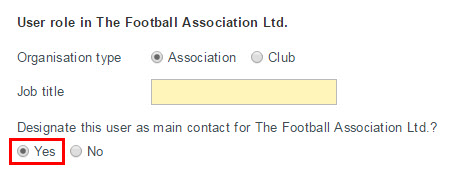
If the organisation already has a TMS manager, the Member Association must confirm that it wishes to assign a different user to the role.
To set an existing user as the TMS manager, send a request to the TMS Helpdesk.
Changing the FCH C&P manager
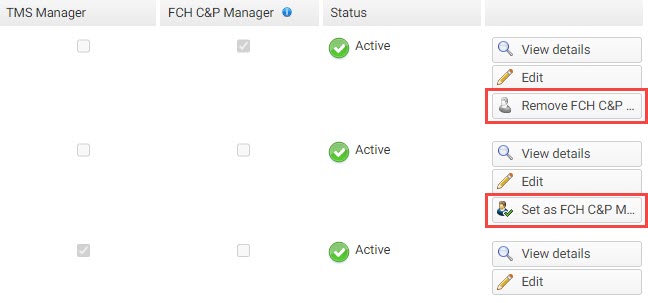
The FIFA Clearing House compliance and payment manager (FCH C&P manager) is the point of contact for all matters related to the FCH entity. If no specific FCH C&P manager has been assigned, the TMS manager will also be the point of contact for the FCH entity by default.
If the club does not participate in TMS (i.e. it has no active TMS users), the system will use the FCH C&P manager information saved under the club profile (see Editing club details).
Note: Member Association TMS managers can set and remove the FCH C&P manager for their organisation and their affiliated clubs. Club TMS managers can set and remove the FCH C&P manager for their organisation only.
Changing user responsibilities in TMS
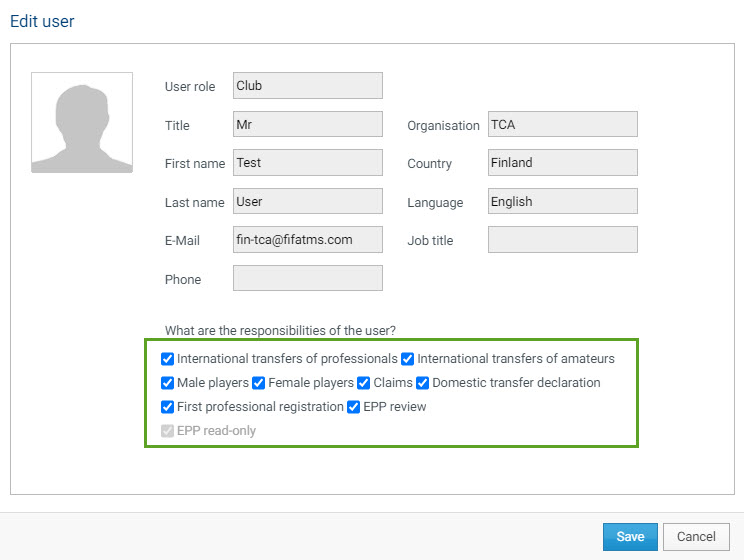
TMS managers can manage user responsibilities in TMS by granting or restricting access to the following modules:
- Responsibilities related to the scope:
- Male player
- Female player
- Responsibilities related to international transfers:
- International transfers of professionals
- International transfers of amateurs
- Responsibilities related to claims:
- Claims
- Responsibilities related to minor applications:
- Minors (for Member Association users only)
- Responsibilities related to the electronic player passport (EPP):
- Domestic transfer declaration
- First professional registration
- EPP review
- EPP read-only
- Responsibilities related to trials:
- Trials
Association TMS managers can change the responsibilities for the following users:
- Themselves
- All TMS users of their Member Association
- All TMS users of their affiliated clubs
Club TMS managers can change the responsibilities for the following users:
- Themselves
- All TMS users of their club
Note: Before changing a user’s responsibilities, the TMS manager must ensure that the user has been trained on the additional responsibilities and TMS modules (see “Training”).
To change a TMS user’s responsibilities, navigate to “Stakeholders > Users”, locate the relevant user and click “Edit”.
Select or deselect the relevant modules. Once you have made the necessary changes, click “Save”.