TABLE OF CONTENTS
Introduction
The Association Task Manager is a control centre that provides Member Associations with visibility over key TMS operations and facilitates the management of tasks where review or action is needed. Parties with a TMS account must review the relevant tabs in TMS daily for any communications from FIFA. Member Associations and clubs are responsible for any procedural disadvantage caused by failing to conduct this review properly.
Navigating the task manager
Notifications are grouped into tabs and subdivided into categories that are visible to users based on their TMS role and associated permissions.
Users can use the search and filter options to easily identify notifications relating to specific instructions or TMS operations.
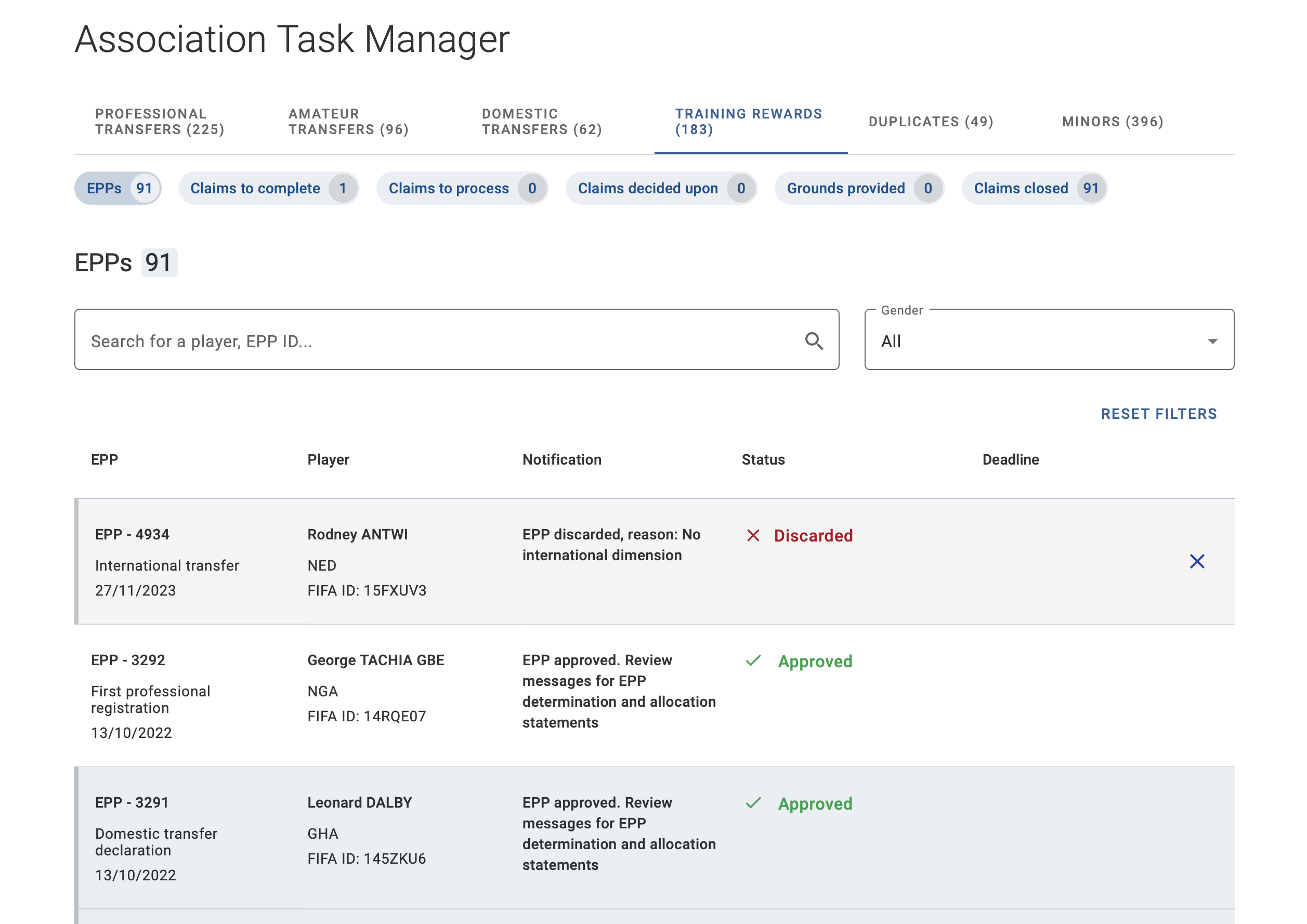
Notifications are sorted by default from newest to oldest. To ensure Member Associations can distinguish the status of tasks at a glance, any new notification that has not yet been opened by a user in the organisation will be highlighted in blue with a grey stroke on the left. After any user in the Member Association views the task from the task manager, it will be shown as opened for all users.
Note: If a user views the details of a task via the transfer overview grid, it will not be counted as opened in the Association Task Manager.
Management and dismissal of notifications in the task manager is specific to each category and is set based on the type of action required by the Member Association: some tasks are informational and can be dismissed by selecting the "X" icon, while others require action before they disappear from the list of open tasks. Task dismissal applies across the task manager of all users within the organisation.
Where applicable, the deadline for action or response by the Member Association is displayed in the notification.
Professional and amateur transfers
The “Professional transfers” and “Amateur transfers” include categories related to all steps of the transfer process to provide Member Associations with a comprehensive overview of any actions required or updates to TMS instructions for review.
Players to confirm
Transfers in “Awaiting confirmation of player” status are notified to the former association in the “Players to confirm” category.
Each pending task will display the time elapsed since the player confirmation was requested. These notifications must be reviewed promptly to avoid delays in the transfer process and will not be dismissed from the task manager until the player confirmation is completed.
For more guidance, please refer to our article on player confirmation.
International Transfer Certificate (ITC)
The “Professional Transfers” and “Amateur Transfers” tabs display four types of ITC-related notifications:
- ITCs to request by the new association – transfers in “Awaiting ITC request” status
- ITCs to deliver by the former association – transfers in “Awaiting ITC delivery” status
- Players to register by the new association – transfers in “Awaiting ITC receipt” or “Awaiting registration confirmation” status.
- Registrations without ITC
The “Registrations without ITC” category is informational and notifies the former association of transfers that were completed without the delivery of an ITC. The former association must review the instructions and ensure that the players are deregistered from their National Registration System. No further action is needed in TMS.
For more guidance, please refer to our article on confirming registration without the ITC.
Validation exceptions
For international transfers where a request to override a validation exception has been submitted, the Member Association is notified of the FIFA response via the “FIFA communications” category.
Loans
The Member Association is notified via the “Loans” category when:
- an affiliated club has taken an action on a loan, such as an extension, permanent transfer or conclusion.
- an affiliated club must review the status of an open loan where the end date has passed.
The notification will specify the action that has been taken by the club in the loan instruction.
For open loans where the end date has passed, the notification will show the transfer as “To process”. Member Associations must contact their clubs to ensure that the appropriate action is taken in TMS to reflect the subsequent movement of the player. The item will disappear from the list of open tasks only after all relevant clubs have processed the loan.
For more guidance, please refer to our article on the introduction to loans.
Cancellations
Two cancellation-related categories are available for review.
The “Cancellation requests” category notifies the Member Association of international transfers for which the counter association has requested a cancellation on the basis that it contains incorrect information. The association must review and respond to this request in TMS. Once a cancellation request is accepted, rejected, or withdrawn, the task is automatically removed from the list.
The “Cancelled Transfers” category is purely informational and lists international transfers involving affiliated clubs that have been cancelled following the rejection of a player by the former association, the acceptance of the cancellation request by the counter association, or by FIFA. These notifications allow the association to review transfers that have been cancelled by other parties, enabling the submission of a new transfer where applicable.
For more guidance, please refer to our article on cancelling transfers.
Domestic transfers
Member Associations that use DTMS are also responsible for approving and authorising domestic transfers submitted by their affiliated clubs.
The “Transfers to approve” category lists domestic transfers in “Awaiting transfer approval” status while the “Transfers to authorise” category notifies the Member Association of domestic transfers in validation exception status.
Both categories require action by the association.
Training rewards
The training rewards tab includes categories related to the Electronic Player Passport (EPP) review process as well as claims.
Electronic Player Passport
Member Associations participating in an EPP review process receive notifications when:
- the association is invited to participate in an EPP;
- the status of an EPP changes;
- a message is sent to the association in the EPP; or
- a change to the registration information submitted by the Member Association is processed by the FIFA general secretariat. For notifications generated on or after 29 September 2026, selecting the notification opens the EPP overview page at the registration line corresponding to the change. Notifications generated before this date will continue to open the overall EPP page.
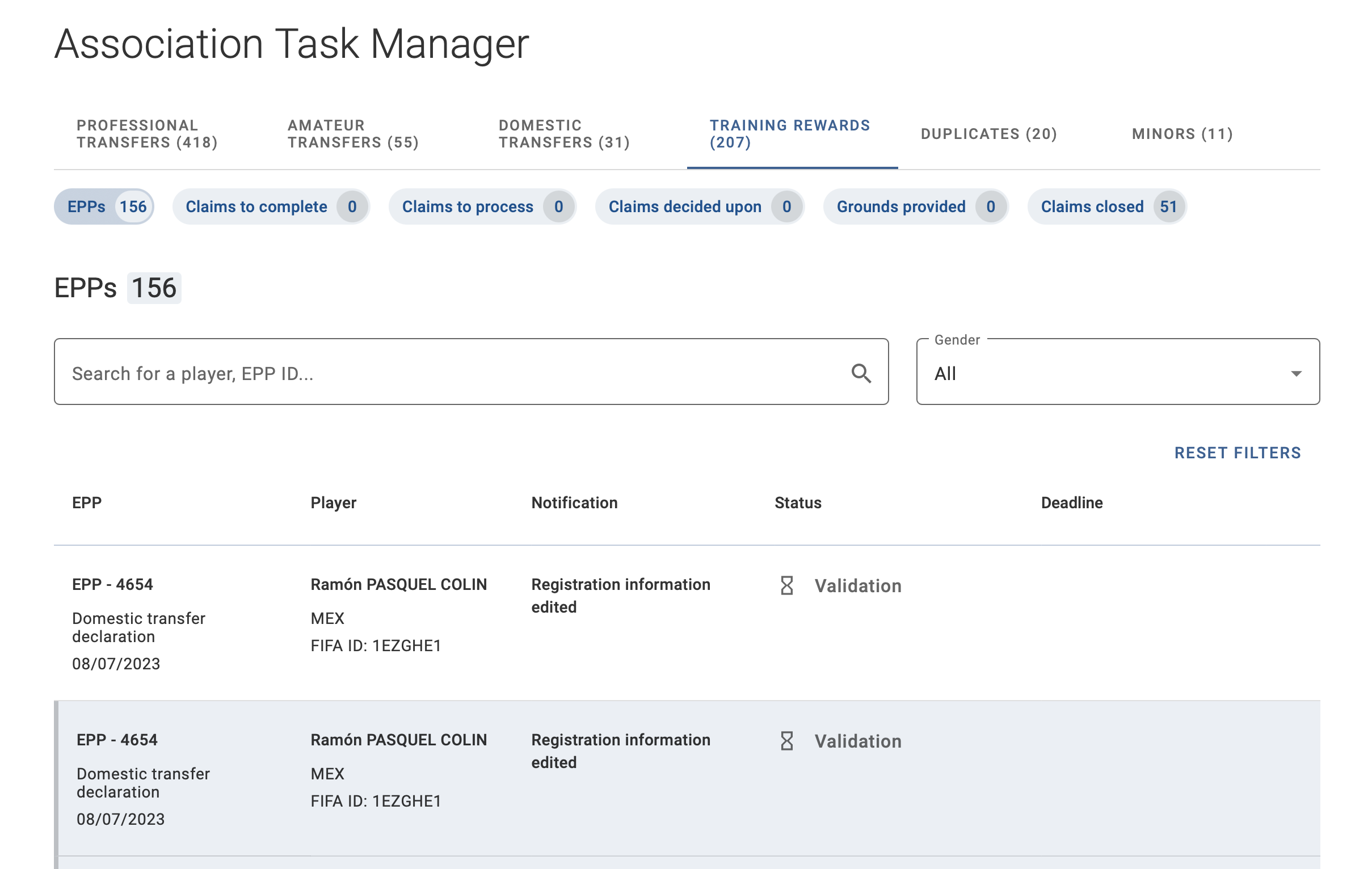
For more information, see the article on EPP notifications.
Claims
Where a Member Association submits a claim for training compensation or solidarity contribution on behalf of its affiliated club, the association receives notifications when:
- a claim in “Pending” or “Awaiting completion” status must be completed;
- a claim in “Awaiting response”, “Awaiting second submission” or “Awaiting additional information from relevant parties” must be processed;
- a decision or grounds have been notified in a claim;
- a claim has been closed.
For claims that must be completed or processed, the association also receives notifications directly in the “Claims” module via:
- banners at the top of the claims grid overview page;
- an “Action required” flag displayed in the status of the claim.
For more guidance, please refer to our article on the claim process in TMS.
Duplicates
Member Associations are notified when a potential duplicate is identified for a registered player or club that has not yet been assigned a FIFA ID.
To facilitate the review of potential club duplicates and assignment of FIFA IDs, Member Associations can export the list of duplicates which can then be compared to the records in the national registration system.
For guidance on processing these duplicates, refer to the relevant sections on:
Minors
The minors tab includes categories related to minor applications as well as the limited minor exemption.
For minor applications, the engaging association receives notifications when:
- an application in “Pending” status must be completed;
- a decision or grounds have been notified;
- an application has been cancelled automatically or manually by FIFA.
Specific to minor applications for the international transfer of players, the releasing association is notified of applications in “Awaiting counter approval” status in the “Application to approve” category.
Instances where FIFA has requested additional documents or sent information letters to the association are listed in the “FIFA communications” category.
Where a deadline applies, it is displayed directly in the notification. This is the case for applications to approve and for FIFA communications where additional documents have been requested.
For more guidance, please refer to our article on the minor application process.
Email notifications
TMS users may also receive notification emails sent by TMS from the following two addresses.
- eppnotifications@fifa.org - for the electronic player passport review process
- tmsnotifications@fifa.org - for account activation, password reset, two-step verification and claims
Please make sure that these email addresses are added to your contacts to ensure that you receive all communications.
These addresses are used only for automated notifications and are not monitored for incoming emails.